How to Track Overnight Shifts That Cross Midnight (iPhone Guide)
How to Track Overnight Shifts That Cross Midnight
If you work nights — in healthcare, hospitality, security, logistics or a graveyard retail shift — you already know the pain: your shift starts on one date and ends on another, and most time trackers quietly mangle the math somewhere around 00:00.
A shift from 22:00 to 06:00 is not “22:00 on day one plus 06:00 on day two as two separate entries.” It is one continuous 8-hour shift that happens to cross midnight. Your timesheet should reflect that, and your overtime and pay calculations should too.
Why midnight is where most apps fail
Time entries are usually stored as start date + time and end date + time. A naive app calculates the elapsed time by subtracting the times — and if the end time is smaller than the start time (06:00 < 22:00), it can:
- Return a negative duration
- Assume you worked 16 hours instead of 8
- Drop the entry entirely
- Require you to manually split the shift into two rows and hope the totals still line up
That last workaround is the most common, and it is exactly the kind of manual spreadsheet math that leads to pay disputes at the end of the month.
What a correct overnight timesheet looks like
A proper overnight timesheet shows the shift as one row, with the true elapsed time:
| Date | Start | End | Hours | Pay @ $23/h |
|---|---|---|---|---|
| Mon | 22:00 | 06:00 | 8h 00m | $184.00 |
| Tue | 22:00 | 06:00 | 8h 00m | $184.00 |
No split rows. No “negative hours.” Just eight hours of work, priced correctly, rolling into your weekly totals with the day boundary handled behind the scenes.
How to track overnight shifts in Work Log
Work Log — Hours Tracker was built for schedules like this. Here is how a typical night shift gets recorded:
- Clock in the normal way — tap Clock in at 22:00. When you clock out at 06:00 the next morning, the app knows the shift crossed midnight and stores the real elapsed duration.
- Forgot to clock in? Add a manual entry: choose the start date with 22:00 and the end date with 06:00. The app still treats it as one continuous shift.
- Repeating night rota? Use batch add to fill the whole week (Mon–Fri, 22:00–06:00) in one action instead of creating five entries.
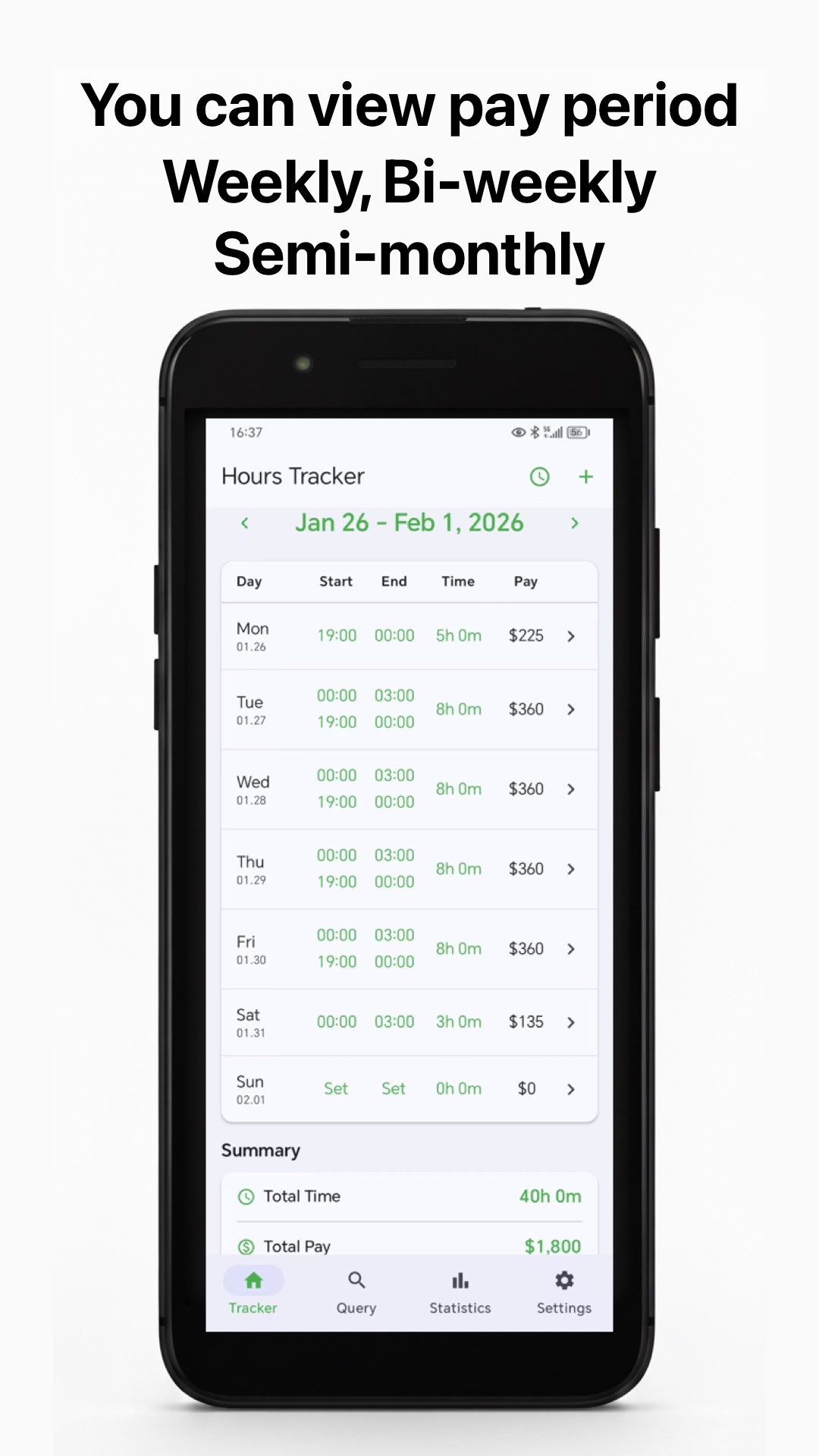
- Review the totals — your pay period table shows Total time and Total pay updated for the night shifts, alongside any day shifts you worked that week.
The pay column uses the hourly rate you set for that job, so a 22:00–06:00 shift at $23.00/h shows $184.00 for 8 hours — no manual multiplication needed at 3 a.m.
Overtime after midnight
Night workers often hit overtime during a shift that crosses midnight. Work Log flags hours beyond your configured threshold (typically 8 per shift or 40 per week) in orange and prices them at your overtime multiplier automatically.
Example: 22:00 start, 09:30 clock-out the next morning.
- Total: 11h 30m
- Regular: 8h × $23.00 = $184.00
- Overtime: 3h 30m × $34.50 (1.5×) = $120.75
- Gross: $304.75 — all of it computed while the shift was still running.
Common overnight-shift mistakes to avoid
- Splitting the shift manually — it works, until you forget one half. Keep it as one entry.
- Using the wrong end date — an “end at 06:00 same day” entry will quietly lose the shift from your totals.
- Entering 22:00–06:00 as 16 hours — check the Time column; if it says 16h the app is treating the end time incorrectly.
- No notes — night posts often involve handovers and site notes. Attach them to the entry so the detail survives payroll week.
Tip: set a clock-out reminder for your usual end time. It is very easy to fall asleep on a break or lose track at 05:30 — a reminder keeps the entry accurate without you watching the clock.
FAQ
Does Work Log split overnight shifts across two days? Internally the day boundary is handled correctly so dates and summaries stay accurate, but you see one continuous shift row.
Can I mix night shifts and day shifts in one pay period? Yes. Both appear in the same weekly, bi-weekly or semi-monthly table with combined totals.
Is the app's overtime math exact? The app prices overtime with the multiplier you configure (1.5× is the default). Double-check your contract or labor rules, since thresholds vary by region and employer — the app is a tool, not a lawyer.
Track your next night shift accurately
Work Log — Hours Tracker makes overnight shifts and overtime effortless. It is free to download, and your time data stays in your own iCloud.
Download: Work Log on the App Store · Google Play